Inkscape
free open-source vector design software for macOS, Linux, and Windows
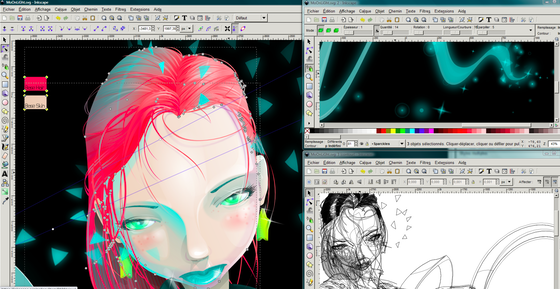
Inkscape is a Free and open source vector graphics editor for GNU/Linux, Windows and macOS. It offers a rich set of features and is widely used for both artistic and technical illustrations such as cartoons, clip art, logos, typography, diagramming and flowcharting. It uses vector graphics to allow for sharp printouts and renderings at unlimited resolution and is not bound to a fixed number of pixels like raster graphics. Inkscape uses the standardized SVG file format as its main format, which is supported by many other applications including web browsers.
Supported Formats
Inkscape can import and export various file formats, including SVG, AI, EPS, PDF, PS and PNG. It has a comprehensive feature set, a simple interface, multi-lingual support and is designed to be extensible;
Features
Object creation
- Drawing: pencil tool (freehand drawing with simple paths), pen tool (creating Bézier curves and straight lines), calligraphy tool (freehand drawing using filled paths representing calligraphic strokes)
- Shape tools: rectangles (may have rounded corners), ellipses (includes circles, arcs, segments), stars/polygons (can be rounded and/or randomized), spirals
- Text tool (multi-line text, full on-canvas editing)
- Embedded bitmaps (with a command to create and embed bitmaps of selected objects)
- Clones ("live" linked copies of objects), including a tool to create patterns and arrangements of clones
Object manipulation
- Transformations (moving, scaling, rotating, skewing), both interactively and by specifying exact numeric values
- Z-order operations (raising and lowering)
- Grouping objects ("select in group" without ungrouping, or "enter the group" making it a temporary layer)
- Layers (lock and/or hide individual layers, rearrange them, etc; layers can form a hierarchical tree)
- Alignment and distribution commands
Fill and stroke
- Color selector (RGB, HSL, CMYK, color wheel, CMS)
- Color picker tool
- Copy/paste style
- A gradient editor capable of multi-stop gradients
- Pattern fills (bitmap/vectors)
- Dashed strokes, with many predefined dash patterns
- Path markers (ending, middle and/or beginning marks, e.g. arrowheads)
Operations on paths
- Node editing: moving nodes and Bezier handles, node alignment and distribution, etc.
- Converting to path (for text objects or shapes), including converting stroke to path
- Boolean operations
- Path simplification, with variable threshold
- Path insetting and outsetting, including dynamic and linked offset objects
- Bitmap tracing (both color and monochrome paths)
Text support
- Multi-line text
- Uses any installed outline fonts, including right-to-left scripts
- Kerning, letterspacing, linespacing adjustments
- Text on path (both text and path remain editable)
- Text in shape (fill shape following stroke)
Rendering
- Fully anti-aliased display
- Alpha transparency support for display and PNG export
- Complete "as you drag" rendering of objects during interactive transformations
File formats
- Perfectly compliant SVG format file generation and editing
- Live watching and editing the document tree in the XML editor
- PNG, OpenDocument Drawing, DXF, sk1, PDF, EPS and PostScript export formats and more
- Command line options for export and conversions
Similar Apps
Pencil2D Animation
An easy, intuitive tool to make 2D hand-drawn animations.