DocFetcher - App Details
Back to directory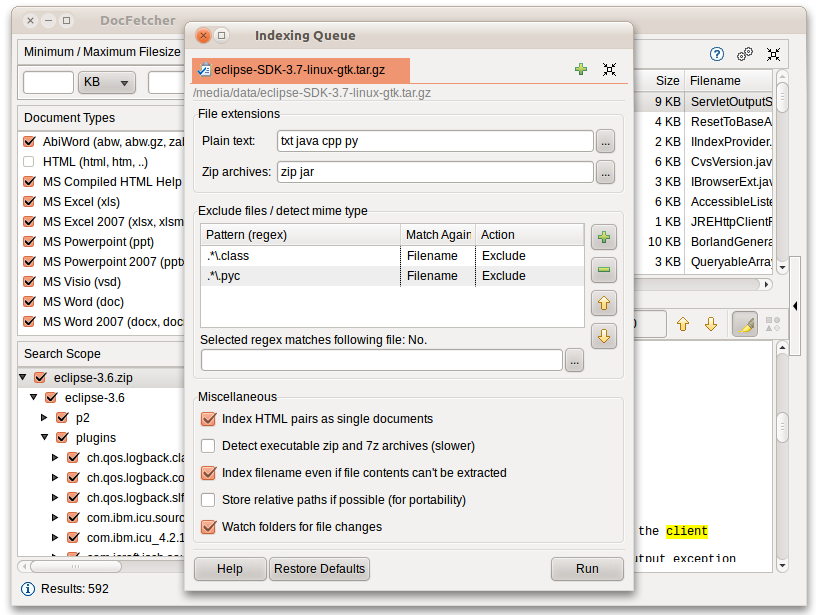
DocFetcher
File Search Tool
Tags:#Desktop search#File search#Folder search#Pdf#Productivity#Search app#Search#System#Text#Tool#Tools#Txt#search#file search#system#productivity#folder search#tools#tool#folder search#pdf#text#txt#search app#desktop search
License
Eclipse Public License
Platforms
macOS
Other Platforms
WindowsLinux
DocFetcher is an Open Source desktop search application: It allows you to search the contents of files on your computer. — You can think of it as Google for your local files. The application runs on Windows, Linux, and OS X, and is made available under the Eclipse Public License.
Features
- A portable version: There is a portable version of DocFetcher that runs on Windows, Linux and OS X. How this is useful is described in more detail further down this page.
- 64-bit support: Both 32-bit and 64-bit operating systems are supported.
- Unicode support: DocFetcher comes with rock-solid Unicode support for all major formats, including Microsoft Office, OpenOffice.org, PDF, HTML, RTF and plain text files.
- Archive support: DocFetcher supports the following archive formats: zip, 7z, rar, and the whole tar.\_ family. The file extensions for zip archives can be customized, allowing you to add more zip-based archive formats as needed. Also, DocFetcher can handle an unlimited nesting of archives (e.g. a zip archive containing a 7z archive containing a rar archive... and so on).
- Search in source code files: The file extensions by which DocFetcher recognizes plain text files can be customized, so you can use DocFetcher for searching in any kind of source code and other text-based file formats. (This works quite well in combination with the customizable zip extensions, e.g. for searching in Java source code inside Jar files.)
- Outlook PST files: DocFetcher allows searching for Outlook emails, which Microsoft Outlook typically stores in PST files.
- Detection of HTML pairs: By default, DocFetcher detects pairs of HTML files (e.g. a file named "foo.html" and a folder named "foo\files"), and treats the pair as a single document. This feature may seem rather useless at first, but it turned out that this dramatically increases the quality of the search results when you're dealing with HTML files, since all the "clutter" inside the HTML folders disappears from the results.
- Regex-based exclusion of files from indexing: You can use regular expressions to exclude certain files from indexing. For example, to exclude Microsoft Excel files, you can use a regular expression like this: .\\.xls
- Mime-type detection: You can use regular expressions to turn on "mime-type detection" for certain files, meaning that DocFetcher will try to detect their actual file types not just by looking at the filename, but also by peeking into the file contents. This comes in handy for files that have the wrong file extension.
- Powerful query syntax: In addition to basic constructs like OR, AND and NOT DocFetcher also supports, among other things: Wildcards, phrase search, fuzzy search ("find words that are similar to..."), proximity search ("these two words should be at most 10 words away from each other"), boosting ("increase the score of documents containing...")
Supported Document Formats
- Microsoft Office (doc, xls, ppt)
- Microsoft Office 2007 and newer (docx, xlsx, pptx, docm, xlsm, pptm)
- Microsoft Outlook (pst)
- OpenOffice.org (odt, ods, odg, odp, ott, ots, otg, otp)
- Portable Document Format (pdf)
- EPUB (epub)
- HTML (html, xhtml, ...)
- TXT and other plain text formats (customizable)
- Rich Text Format (rtf)
- AbiWord (abw, abw.gz, zabw)
- Microsoft Compiled HTML Help (chm)
- MP3 Metadata (mp3)
- FLAC Metadata (flac)
- JPEG Exif Metadata (jpg, jpeg)
- Microsoft Visio (vsd)
- Scalable Vector Graphics (svg)