Zim
Desktop Wiki and Personal Knowledge-base
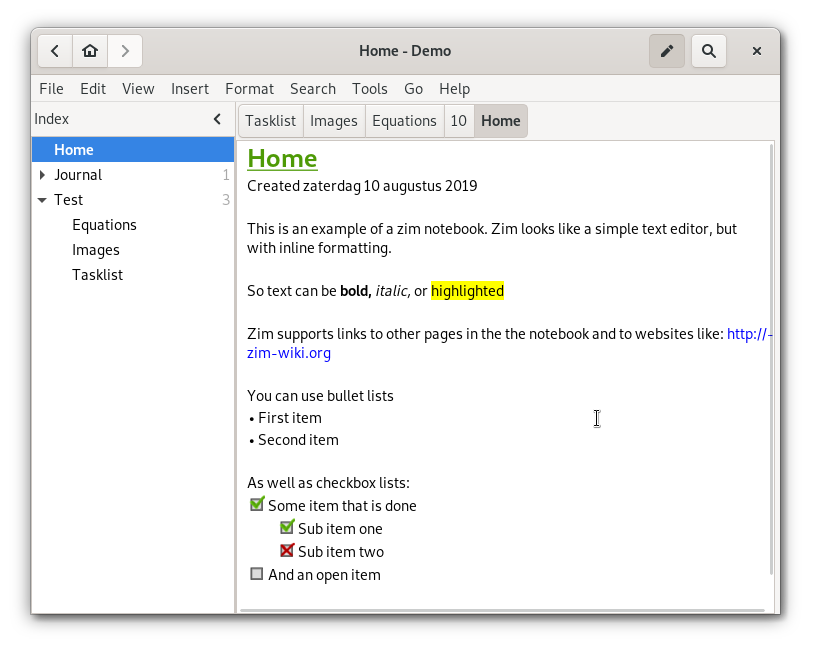
Zim is an open source free lightweight note-taking application in a form of desktop wiki. It allows you to organize your notes, articles, resources, and ideas all in one place, connect them together using page links, attach media and documents and more.
> Zim is a graphical text editor used to maintain a collection of wiki pages. Each page can contain links to other pages, simple formatting and images. Pages are stored in a folder structure, like in an outliner, and can have attachments. Creating a new page is as easy as linking to a nonexistent page. All data is stored in plain text files with wiki formatting. Various plugins provide additional functionality, like a task list manager, an equation editor, a tray icon, and support for version control.
By default, Zim supports wiki syntax and a long set of shortcuts keybindings that makes writing a pleasing experience.
It comes with a spell checker plugin, that you can enable or disable.
Use-cases
ou can use it to:
- Keep an archive of notes
- Keep a daily or weekly journal
- Take notes during meetings or lectures
- Organize task lists
- Draft blog entries and emails
- Do brainstorming
Zim comes with a strong built-in search engine that looks through all of your notes, images, pages, and return accurate results. So, it is ok to have a large sum of notes.
Plugins
Zim also is a modular app that allows you to extend its functionality by installing plugins, create custom tools, conversion scripts, and page templates.
In the following a quick list for the most useful plugins:
- Attachment browser: this plugin allows you to browse and search all of your attachments in one place.
- Command Palette: It is something like VS Code command place, where you can start it quickly and run your commands.
- Gnuplot Editor: a Plot creator and editor
- Inline calculator: This plugin allows you to evaluate simple mathematical expressions in zim.
- macOS Menubar: Allows better macOS native support.
- Link map: allows an alternative view of the internal organization of a notebook.
- Quick note: offers a dialog for inserting quick notes into a notebook. It can be invoked from the command line and can therefore easily be bound to keyboard shortcuts or used in scripts.
- Tags: adds a tag cloud and a page index organized by tags in the side pane.
- Table editor: Add and edit tables inside your content.
- Spell checker
- Distraction free editor: adds settings that help using zim as a distraction-free editor.
- Page Index: provides the page index side pane for the main window.
- Tasks list: Task List plugin adds a dialog that lists open items across all pages of the current notebook.
- Insert a quick screenshot: adds a dialog that allows you to take a screenshot of the desktop or a particular window and directly insert the image into the current ZIM page.
- Table of content (ToC)
- Sequence Diagram editor
- Print to the browser
- Arithmetic: This plugin allows you to evaluate arithmetic expressions in a zim page.
- Source view
Install on macOS (Homebrew)
bash
brew install zim
You can also install a Zim as a DMG package.