Mergen
macOS Audit and Security Check Tool
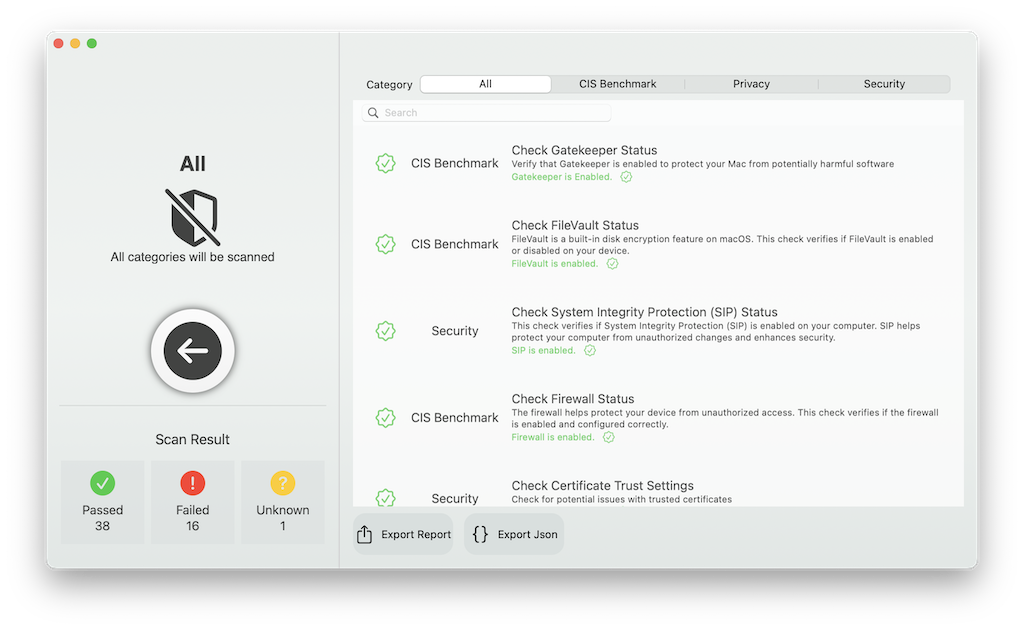
Mergen is an open-source, native macOS application for auditing and checking the security of your Mac. It scans your system for security issues based on the Center for Internet Security (CIS) Benchmark, and checks various settings and configurations related to security and privacy.
Features
1. Check Gatekeeper Status
2. Check Secure Kernel Extension Loading
3. Guest Login Status Check
4. iCloud Drive Status Check
5. Check If SSH Is Enabled
6. Check Firewall Status
7. Check FileVault Status
8. Check All Apple-Provided Software Is Updated In Last 30 Days
9. Check Auto Update Is Enabled
10. Check 'Install Application Updates from the App Store' Is Enabled
11. Check Install Security Responses and System Files Is Enabled
12. Check 'Install system data files and security updates' Is Enabled
13. Check Firewall Stealth Mode Is Enabled
14. Check AirDrop Is Disabled
15. Check AirPlay Receiver Is Disabled
16. Check 'Set Time and Date Automatically' Is Enabled
17. Check Time Is Set Within Appropriate Limits
18. Check DVD or CD Sharing Is Disabled
19. Check Screen Sharing Is Disabled
20. Check File Sharing Is Disabled
21. Check Printer Sharing Is Disabled
22. Check Remote Login Is Disabled
23. Check Remote Management(ARDagent) Is Disabled
24. Check Remote Apple Events Is Disabled
25. Check Internet Sharing Is Disabled
26. Check Content Caching Is Disabled
27. Check Media Sharing Is Disabled
28. Check Bluetooth Sharing Is Disabled
29. Check Backup Automatically is Enabled If Time Machine Is Enabled
30. Check that Time Machine is Enabled
31. Check Time Machine Volumes Are Encrypted If Time Machine Is Enabled
32. Check Show Wi-Fi status in Menu Bar Is Enabled
33. Check Show Bluetooth Status in Menu Bar Is Enabled
34. Check Location Services Is Enabled
35. Check Location Services Is in the Menu Bar
36. Check Personalized Ads Status
37. Check Screen Saver Corners Are Secure
38. Check Universal Control is Disabled
39. Check Wake for Network Access is Disabled
40. Check an Inactivity Interval of 20 Minutes or Less for the Screen Saver Is Enabled
41. Check a Password is Required to Wake the Computer from Sleep or Screen Saver
42. Check Security Auditing Is Enabled
43. Check System Integrity Protection (SIP) Status
44. Check XProtect Status
45. Check Certificate Trust Settings
46. Check Siri Status
47. Check Sending Diagnostic and Usage Data to Apple Status
48. Check Java 6 Default Runtime Status
49. Check EFI Version is Valid and Regularly Checked
50. Check Bonjour Advertising Service Status
51. Check HTTP Server Status
52. Check NFS Server Status
53. Check 'Show Password Hints' Status
54. Check 'Allow guests to connect to shared folders' Status
55. Check Filename Extension Status
56. Check Automatic Run of Safe Files in Safari
57. Check Safari Disable Internet Plugins for Global Use
58. Check Fast User Switching Status
More Features
1. Reporting
2. Export Reports to HTML
3. Export Reports to JSON
License
- MIT License
- Copyright (c) [2023] [Samet Sazak]
Similar Apps
CalmAV
an open-source antivirus engine for detecting trojans, viruses, malware & other malicious threats